






- Joined
- 20-Jun-2003
- Messages
- 2,010
- Reaction score
- 160
- Age
- 51
- Lumina
- 430,927
- Gender
- Female
HP
85/85
EP
79/80
So you're new here! Congratulations on beginning an epic adventure, and welcome! I know that if you're new to using a forum, this place can look kinda scary, maybe even intimidating, but I promise, it's really a lot of fun here, once you get used to navigating around. Shall we begin with the guided tour?
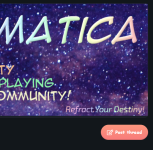
You'll be greeted with a simple looking entry form, but there's a lot of options available to you. For example, you can create a simple discussion, you can make an article for longer, prettier that include more formatting and images, you can also make a poll to conduct surveys, and finally, you can ask a question, and members (hopefully) will respond with solutions.
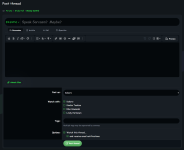
After you've decided which style of post you'd like to write, next I recommend just diving right in and start writing your post. You've got you typical formatting options of Bold, Italics, font size, font color, and there's hidden things too that you can get to by clicking on the three vertical dots (Font face, Strike Out, Underline, Inline Code, and Inline Spoiler). Next you've got options for Bullets and Numbering, Text Alignment, and Headings. Then there's Links, Pictures, Smilies/Emojis, GIFs, Embedded Media, Quotes, and another hidden menu of three dots (Tables, Horizontal Line, Spoiler Section, and Code Block). Finally, over to the far right, we've got Undo and Redo, there's also Toggle BBCode, Drafts, and Preview.

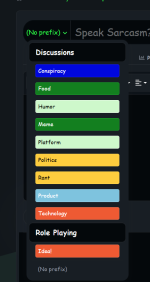
After you've typed your post, it's required to have a Subject. You'll also have an opportunity to add a Prefix. Prefixes are arranged alphabetically and grouped by category for your convenience.
Towards the bottom of the post entry form, you can attach images and files. Prismatica also offers the ability to post as Characters as well. We've got the Linked Accounts extension. This is recommended if you're participating in a role playing game.

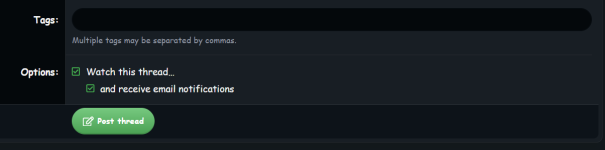
Finally, you can add Tags to your post to help others find your post. I'll admit, I'm pretty bad about this, because SMF didn't have this feature. But I'm getting better... The last bit on the post entry form is options to opt-in to receive notifications.

Next you'll see Find Threads. There are options for Your Threads, Threads with your posts (I'm assuming that's Replies), Unanswered Threads, and all your Watched Threads, which is useful to manage your notifications.
Watched gives you the same list as Watched Threads under the Find Threads menu item.
Search Forums gives you a form filled with advanced criteria. Note that you can search for other things than simply Posts here.
Mark Forums Read will clear any and all NEW markers from the forum-- in case you've been on vacation or away for reasons.
Then there's the Shop. Which isn't to be confused with the Store. The shop contains all sorts of goodies that enhance your forum experience. You can upgrade your profile, add links to your signature, stylize your member name, etc. It's all powered by the Lumina, a virtual, non-redeemable-for-cash currency that you earn by posting on Prismatica. You do have the option to purchase Lumina. One USD worth is equal to 2,500 Lumina. I know it sounds like a lot, and trust me, you'll quickly earn Lumina. You'll earn Lumina simply for logging onto Prismatica today, and tomorrow, and every day after that. Depending on how long your posts are, you'll earn extra Lumina. The Shop has some categories in it. Forum Operations, allows you to manipulate the forum itself. You can Delete a Thread for example, or Create your own role playing game. Then there's Member Modifications. Tweak your profile using these options. Finally, there's Character Assets. These are used within role playing games to enhance the experience for your characters.
Forms are the last option in this menu. Currently, there's only the option to fill out a Player Application (which is the same form you can fill out in the Member Introductions board. This option is here to allow for standardized character sheets for the many role playing systems that I own and will eventually build forms for-- assuming there's any interest in that.
Organization
Prismatica has four main sections, called Categories.- The first one is all the Administrative stuff. Here, you'll find news and notices about software upgrades, feature implementation, and topic manipulations (moving, deleting spam from spam-bots, etc). There's also a spot to talk about features that you'd like to see added, and if you happen to discover any atrocious bugs, please let us know about them. This is also where you'll be able to introduce yourself as a new member, and get to know your fellow comrades.
- Next we have the meat and potatoes of Prismatica, the special interest topics. There's a number of dedicated boards found here, two of which support our primary mission:
- Anime and Table Top Role Playing. These are general boards that aren't necessarily dedicated toward any specific titles. Specific titles are found over in our Clubs area, but we'll get into that later.
- You'll also find various Hobbies in this section. Everything from Creative Writing to Video Games have their own boards, and if that's not enough, we've got the Gossip board for everything else.
- Speaking of the Gossip board, that's got some unique areas I should mention.
- The Bored Games is where all the silly little forum games go. These are useful if you just want to boost your Post Count. Some people are into that.
- Then there's the Memes board. Ranting and raving about politics, or general shit posting happen in here. Obviously, the memes live here too.
- Finally, there's the Ecchi Cafe, the mature area of the forum. And as the title suggests, and the description reiterates, you must be an adult (specifically over 18 years old) to partake in here, for obvious reasons.
- After the general discussion area, we've got our primary focus: Role Playing Games. These are all Play by Post (PbP) games, that may use a published system, or could be freeform. We'll get into how to participate in a forum-based role playing game in a little bit.
- The final section we have is our Living Guidebook for CHIBI, the table top role playing game, yours truly is creating, and will one day publish. But for now, it's being hosted on the forum, for reasons.
Features
Prismatica uses the XenForo forum software, so if you've used a forum before, you may already be familiar with how XenForo works. If you've come from other Social Media platforms, however, the experience can be a little different. One thing you'll notice is that forums almost demand longer posts, and because of that there's several enhancements that have been made to make this experience more pleasurable! I'll try not to forget anything.Writing a Post
The first thing to go over is How to Make a Post. There's two methods, and both are super easy to navigate. The first method is to click on the Post Thread button, along the upper-right corner of your screen. If you're still in the main forum section, you'll be presented a menu of all the different forums you can post in. It's probably easier to simply navigate to the forum you're interested in and clicking Post Thread there.You'll be greeted with a simple looking entry form, but there's a lot of options available to you. For example, you can create a simple discussion, you can make an article for longer, prettier that include more formatting and images, you can also make a poll to conduct surveys, and finally, you can ask a question, and members (hopefully) will respond with solutions.
After you've decided which style of post you'd like to write, next I recommend just diving right in and start writing your post. You've got you typical formatting options of Bold, Italics, font size, font color, and there's hidden things too that you can get to by clicking on the three vertical dots (Font face, Strike Out, Underline, Inline Code, and Inline Spoiler). Next you've got options for Bullets and Numbering, Text Alignment, and Headings. Then there's Links, Pictures, Smilies/Emojis, GIFs, Embedded Media, Quotes, and another hidden menu of three dots (Tables, Horizontal Line, Spoiler Section, and Code Block). Finally, over to the far right, we've got Undo and Redo, there's also Toggle BBCode, Drafts, and Preview.
After you've typed your post, it's required to have a Subject. You'll also have an opportunity to add a Prefix. Prefixes are arranged alphabetically and grouped by category for your convenience.
Towards the bottom of the post entry form, you can attach images and files. Prismatica also offers the ability to post as Characters as well. We've got the Linked Accounts extension. This is recommended if you're participating in a role playing game.
Finally, you can add Tags to your post to help others find your post. I'll admit, I'm pretty bad about this, because SMF didn't have this feature. But I'm getting better...
The last bit on the post entry form is options to opt-in to receive notifications.Top Menu
Now, with that out of the way, let's look at some of the other features we've got. I'll point your attention to the top of your screen, the menu bar. There's a lot going on here. We'll go in order of Forums, Clubs, Media, Members, and Store.Forums
I'll be honest here. I've been using this software for over a year now, and I barely remember about this menu. It's literally hiding in plain sight. So do remember it's here, because there's quite a few useful functions here. The first one is the New Posts, which gives a nice listing of every Thread that you haven't read since your last visit, by default. However, there's other New options here too (but that's because Prismatica has a lot to offer)!Next you'll see Find Threads. There are options for Your Threads, Threads with your posts (I'm assuming that's Replies), Unanswered Threads, and all your Watched Threads, which is useful to manage your notifications.
Watched gives you the same list as Watched Threads under the Find Threads menu item.
Search Forums gives you a form filled with advanced criteria. Note that you can search for other things than simply Posts here.
Mark Forums Read will clear any and all NEW markers from the forum-- in case you've been on vacation or away for reasons.
Then there's the Shop. Which isn't to be confused with the Store. The shop contains all sorts of goodies that enhance your forum experience. You can upgrade your profile, add links to your signature, stylize your member name, etc. It's all powered by the Lumina, a virtual, non-redeemable-for-cash currency that you earn by posting on Prismatica. You do have the option to purchase Lumina. One USD worth is equal to 2,500 Lumina. I know it sounds like a lot, and trust me, you'll quickly earn Lumina. You'll earn Lumina simply for logging onto Prismatica today, and tomorrow, and every day after that. Depending on how long your posts are, you'll earn extra Lumina. The Shop has some categories in it. Forum Operations, allows you to manipulate the forum itself. You can Delete a Thread for example, or Create your own role playing game. Then there's Member Modifications. Tweak your profile using these options. Finally, there's Character Assets. These are used within role playing games to enhance the experience for your characters.
Forms are the last option in this menu. Currently, there's only the option to fill out a Player Application (which is the same form you can fill out in the Member Introductions board. This option is here to allow for standardized character sheets for the many role playing systems that I own and will eventually build forms for-- assuming there's any interest in that.


